
AI Agents + Tools in 2025: The Practical Stack (UI, Runtimes, and Orchestration)
If you’ve been building with AI lately, you’ve probably noticed a shift:
We’re moving from “chat with a model” to “ship an agent that does work.”
That sounds simple—until you try to assemble the stack.
Because agents aren’t just prompts. Agents are systems:
- They need a runtime to execute models
- A UI to iterate fast
- Orchestration to plan, call tools, and loop
- Tooling for files, APIs, scrapers, and multimodal workflows
This post is a practical, developer-friendly map of the modern agent stack starting from familiar tools like LM Studio and Ollama, then moving into LangChain alternatives, orchestration layers, and where a local-first agent OS like Shinkai Desktop fits (without turning this into a sales pitch).
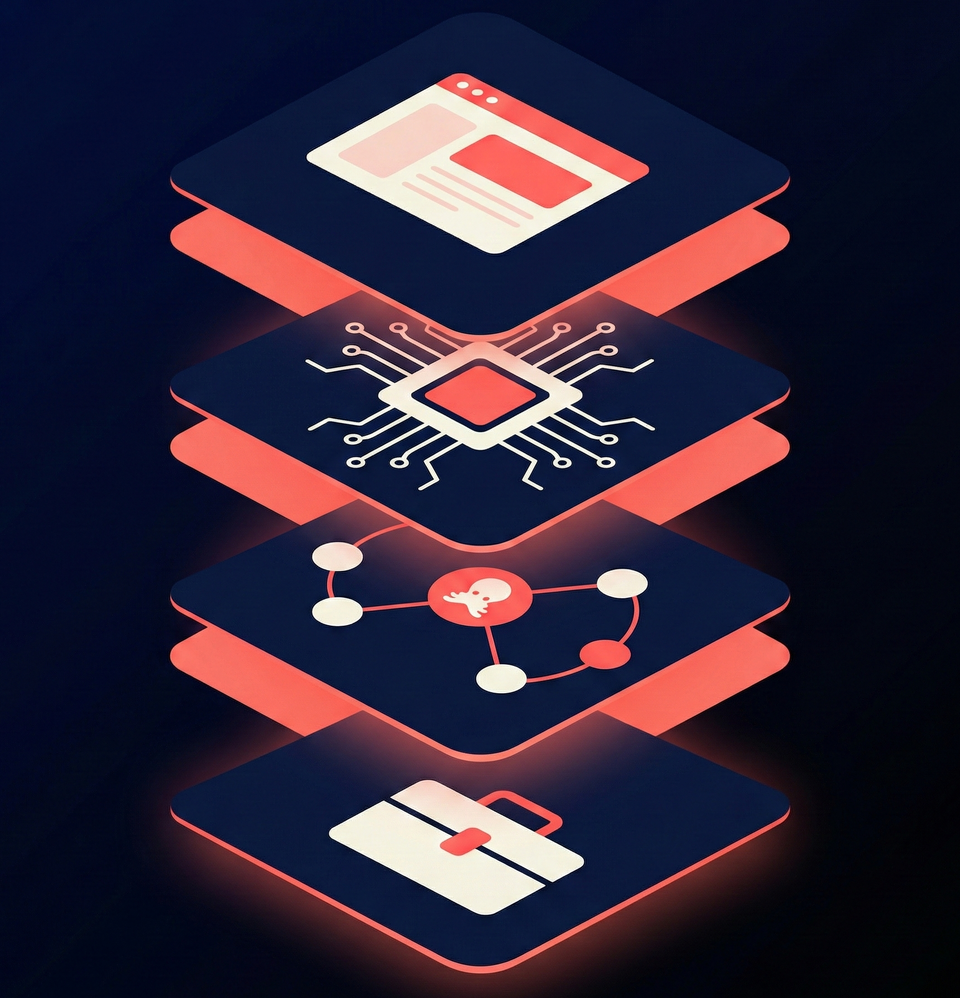
The “Agent Stack” in One Mental Model
Think in layers:
1) UI Layer (Where you test ideas)
This is where most people start, especially when searching “lm studio alternative” or “lm studio alternatives.”
2) Runtime Layer (Where models actually run)
This is your local inference engine, Ollama is the most common entry point right now.
3) Orchestration Layer (Where agents become real)
This is where you add:
- tool calling
- memory
- branching/loops
- multi-step plans
- multi-agent workflows
Frameworks like LangChain + LangGraph live here.
4) Tool Layer (Where agents become useful)
“Tools” are what let an agent:
- read/write files
- scrape data
- run code
- call APIs
- generate images/video/audio
That’s the difference between a cool demo and something you actually use daily.
UI Layer: LM Studio, “LM Studio vs Ollama”, and what people really want
LM Studio is popular because it’s a clean UI-first way to run models locally and experiment quickly.
But the search pattern behind “LM Studio vs Ollama” is usually not about which is “better.”
It’s about this:
“I want the speed of a UI, with the power of a real agent workflow.”
LM Studio can get you to “chat locally.”
Once you want agents, you start caring about:
- tool calling
- repeated workflows
- structured outputs
- multi-model routing
- persistent setups
That’s where people begin adding Ollama, then orchestration frameworks, then (eventually) an agent-focused interface.
Runtime Layer: Ollama—and “alternatives to Ollama”
Ollama has become the default local runtime because it’s simple to run models locally and exposes a clean way to integrate that runtime into applications.
If you’re searching “alternatives to ollama”, it usually means you need one of these:
- different hardware support
- more performance control
- production serving patterns
- deeper customization
There are multiple viable runtimes in the ecosystem,but for many developers, the key is not switching runtimes.
It’s making sure your runtime can plug into orchestration + tools cleanly.
Orchestration Layer: LangChain—and “LangChain alternatives” that matter
LangChain popularized a lot of the early “agent app” patterns. But in 2025, orchestration is the real battleground,not which model you use.
If you’re exploring langchain alternatives, here are the categories worth knowing:
Graph-based orchestration (for reliable agents)
LangGraph is designed around state machines / graphs, great when you need controlled loops, branching logic, and repeatable agent behavior.
Data + retrieval-first orchestration
Some frameworks focus on grounding agents in data systems (RAG) and production patterns.
For example, Haystack explicitly positions itself for production-ready RAG + agents with modular building blocks.
Multi-agent coordination
Some teams want agent swarms that collaborate. Microsoft’s AutoGen is often referenced in this context.
The point isn’t which framework wins.
The point is: agents need orchestration that matches your risk tolerance.
- Want fast prototypes? Chain-based flows are fine.
- Want reliability? Graph-based orchestration starts to matter.
- Want production? Observability + structure becomes non-negotiable.
Tool Layer: The real unlock (and why “agents + tools” is the theme)
Agents without tools are just chatbots with delusions of productivity.
When you add tools, agents become:
- operators
- analysts
- assistants
- builders
This is also where multimodal workflows matter,because modern “tools” aren’t only APIs.
They’re models too.
Example: Multimodal tools like “HunyuanVideo 13B”
If you’ve noticed searches like “hunyuanvideo 13b”, that’s part of the same trend:
Developers want agents that can generate more than text.
Tencent’s HunyuanVideo-I2V is one example of an open model artifact that developers incorporate into creative pipelines.
In practice, that means:
- text agent → calls a video tool → returns media output
- “tool calling” becomes “model calling”
- your agent becomes a media pipeline
This is why “agents + tools” is the right framing for 2025.
Where Shinkai Desktop fits : a UI that’s built for agents, not just chat
Once you’ve felt the limits of chat-first UIs, the next step is usually looking for a system that helps you build and run agents, not just test prompts.
Shinkai positions itself as an agent-centric platform (think “AI OS”) where agents can connect to tools and workflows, with an architecture that supports local-first setups when you want privacy and control.
So if your journey looks like:
- Start with LM Studio (UI)
- Add Ollama (runtime)
- Add orchestration (LangChain/LangGraph alternatives)
- Add tools (files, APIs, multimodal)
- Want a single place to run and manage it all…
…it makes sense that keywords like “shinkai desktop” show up alongside “LM Studio alternatives” and “LangChain alternatives.”
A practical “choose your stack” guide (without overthinking it)
If you’re an intermediate builder, here’s a clean path:
- Exploring local models quickly? Start with a UI like LM Studio.
- Turning local models into something programmable? Add Ollama as a runtime layer.
- Building agents that can loop, branch, and stay reliable? Look at graph-style orchestration like LangGraph.
- Want production-ish patterns (RAG + agents)? Evaluate frameworks like Haystack.
- Want the agent experience to feel like a product (not a pile of scripts)? Consider an agent-first environment like Shinkai Desktop.
The new competitive advantage is “tooling + orchestration”
Model quality matters,but most teams don’t fail because their model isn’t smart enough.
They fail because the system can’t:
- connect to data
- call tools reliably
- stay controlled and observable
- run repeatable workflows
In 2026, the winners aren’t just “LLM apps.”
They’re agent stacks, UIs + runtimes + orchestration + tools built like real software.
🐙 Your AI. Your Rules.